What it is
Native ARM64 Android SDK build-tools and platform-tools, built from AOSP source, plus the host toolchain around them: JDK, CMake, Ninja, NDK shims and Flutter/Dart support.
Android app workshop · ARM64
A practical Android toolchain for Linux ARM64—from native SDK tools to signed APKs on a real device. Develop on an Android phone with Termux + PRoot Debian, or on any ARM64 Linux machine.
Real-device workflow validated· native aarch64 tools · offline artifacts
Google's Linux SDK host binaries are x86_64. ADT builds the native host tools from official AOSP source for aarch64/glibc, keeps offline-installable verified artifacts, and validates the whole pipeline on a real physical device.
Native ARM64 Android SDK build-tools and platform-tools, built from AOSP source, plus the host toolchain around them: JDK, CMake, Ninja, NDK shims and Flutter/Dart support.
An ARM64 machine — including an Android phone running Termux + PRoot Debian — should be able to produce, sign, install and validate real APKs, with no x86_64 host in the loop.
Developers on ARM64 Linux — Android devices via Termux/PRoot, Asahi Linux, ARM64 servers and boards — who need a complete, honest Android toolchain.
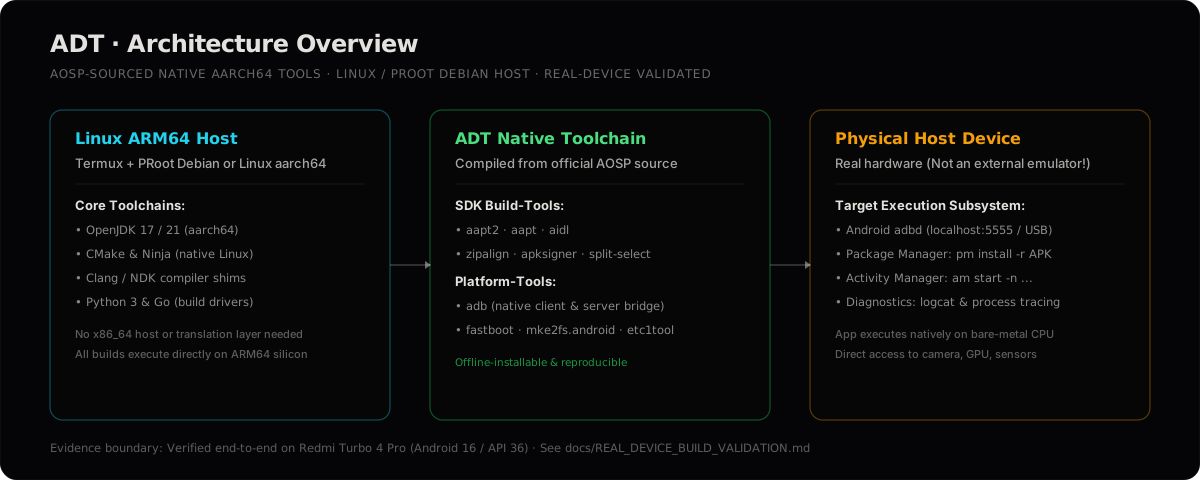
Tools that only need a JVM execution path are architecture-independent at the Java level; everything else is a native aarch64 binary, built from source, or shimmed — and documented as such.
ARM64-native aapt, aapt2, aidl, zipalign, dexdump and split-select, built from AOSP source for linux-arm64.
ARM64-native adb, fastboot and the full platform-tools set, used in the real-device validation.
GCC/Clang, CMake, Ninja and Make for native builds, with Git and source-management tooling.
JDK plus apksigner, d8 and R8 through their JVM execution paths — architecture-independent.
Flutter and Dart alongside Android SDK platforms for application builds on ARM64.
SHA256-verified ARM64 tarballs for expensive builds — install without rebuilding from source.
Every component is classified by how it actually runs — a tool is not marked supported simply because it exists upstream.
| Layer | Tools | Execution path | Status |
|---|---|---|---|
| build-tools 35.0.2 | aapt aapt2 aidl zipalign dexdump split-select | native ARM64, offline artifact | Verified |
| build-tools 36.0.0 | aapt2 aidl zipalign … | native ARM64, offline artifact | Verified |
| build-tools 37.0.0 | aapt2 aidl zipalign … | native ARM64, GitHub Release | Verified |
| platform-tools 35.0.2 / 37.0.0 | adb fastboot | native ARM64, offline artifact | Verified |
NDK 27.2.12479018 | llvm-strip shim | shim → system ARM64 llvm-strip | Verified |
apksigner · d8 · R8 · sdkmanager | signing · dex · shrink · packages | JVM, architecture-independent | Verified |
| cmdline-tools · platforms | sdkmanager downloads | Google-hosted, network needed | Verified |
| build-tools 35.0.1 · 34.x | older patches, deliberately not built | superseded by verified versions | Not yet tested |
Per-version AOSP tags, CI runs and notes are tracked in versions.json. Everyday commands for every tool live in COMMANDS.md.
Works on any aarch64 Linux with glibc — the validated target is Termux + PRoot Debian on an ARM64 phone; Asahi, Raspberry Pi and ARM64 servers follow the same path. Idempotent: re-running updates an existing clone and skips what is already installed.
# এক লাইনে — সংগ্রহশালা এনে সম্পূর্ণ প্রাথমিক সেটআপ চালায়
curl -fsSL https://raw.githubusercontent.com/soobujmiah/adt/main/install.sh | bash
source ~/.bashrc
# কপি থেকে — ধাপে ধাপে নির্দেশসহ অথবা সম্পূর্ণ স্বয়ংক্রিয়
git clone --depth 1 https://github.com/soobujmiah/adt.git && cd adt
./setup.sh # নির্দেশসহ./setup.sh bootstrap --auto # কোনো প্রশ্ন ছাড়াই# পরে যাচাই — সমস্যা হলে কোন অংশে তা শনাক্ত করে
./setup.sh doctorbuild-tools and platform-tools 35.0.2, build-tools 36.0.0 (checked-in, SHA256-verified artifacts), NDK/CMake shims.
cmdline-tools (Google zip) and platforms;android-* — any other build-tools version builds from AOSP source (~2–4 GB, ~15–30 min).
The guided CLI can install the exact tested bundle: ./setup.sh install-profile validated — build-tools 35.0.2 + NDK 27.2 + android-36.
The everyday developer paths. Exact commands — including wireless adb pairing, which trips most people — are in COMMANDS.md.
Native ARM64 aapt2/aidl compile resources and AIDL; Gradle or Flutter assemble the APK. On Termux, Android-targeted native code compiles with Termux Clang and an Android target triple.
Native build guide →Package → align → inspect: aapt2 links resources, zipalign aligns the APK, dexdump inspects DEX. The validated Flutter/Gradle build finished in 1m 21s on the test device.
Validation record →apksigner (JVM, Debian-packaged — no native rebuild needed) signs and verifies APKs on ARM64. Used in the validated end-to-end pipeline.
Signing commands →Native adb over USB or wireless debugging: install, launch, logcat, shell. Pairing and connect use different ports — COMMANDS.md documents the exact sequence.
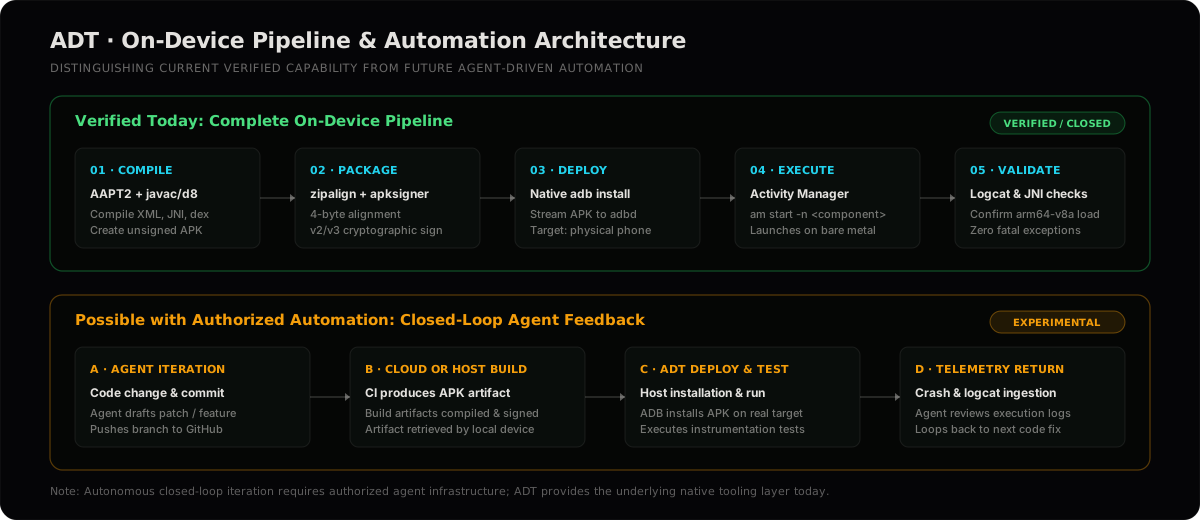
ADB commands →The verified path builds an APK, installs and launches it on the physical phone, checks the ARM64 ABI and reviews logs. Manual and scripted use is verified; an autonomous agent loop is not claimed.
Device validation →These are recorded outcomes from my Redmi Turbo 4 Pro workstation, not promises for every ARM64 device.
A clean Gradle/Flutter APK build completed in 1m 21s; I installed it on the phone, confirmed arm64-v8a, exercised the app and checked for crashes.
I compiled Android-targeted native code, packaged it into an APK, loaded its JNI library on-device and confirmed the process remained alive with clean logs.
The validated setup profile pins build-tools 35.0.2, NDK 27.2 and Android API 36. NDK 28 was also tested as an option after its ARM64 llvm-strip shim was repaired.
The strongest test is the full path, not the presence of binaries. On 2026-09-01 this chain ran end-to-end on a real physical device:
native source → ARM64 shared library → APK packaging → signing →
ADB installation → ARM64 ABI selection → JNI loading → native execution →
log output → process remains alive

# final build      BUILD SUCCESSFUL in 1m 21s   (60 actionable tasks)
# install         adb install -r app-debug.apk → Success
# abi             Device ABI: arm64-v8a · APK primaryCpuAbi: arm64-v8a
# runtime PID observed · crash/ANR scan clean · app aliveREAL_DEVICE_BUILD_VALIDATION.md — status VERIFIED / CLOSED for the validated project state. Device topology, commands and outputs recorded in-repo.
Open record →v35.0.2, v36.0.0 and v37.0.0 published by CI (build.yml on tags) with ARM64 tarballs attached and confirmed via gh release view.
Open releases →versions.json records per-version status, AOSP tag, CI run and honest notes — including what was deliberately not built and why.
Open registry →Shared evidence vocabulary — Verified · Measured · Observed · Experimental · Not yet tested · Not supported:
Verified Measured Observed Experimental Not yet tested Not supported
Honesty boundary: the full chain is physically validated on one device family (Redmi Turbo 4 Pro, PRoot Debian). On any other host the scripts are identical, but "should work" is not "verified" — run ./setup.sh doctor as your first evidence check.
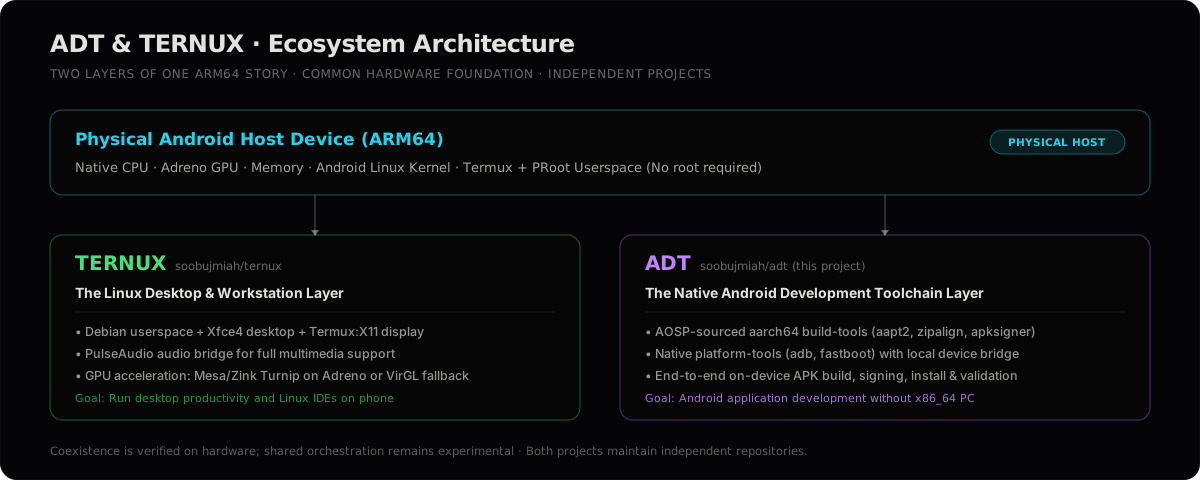
The development-toolchain layer: native SDK build-tools, platform-tools, signing and ADB workflows for Linux ARM64.
A no-root Debian + Xfce4 desktop on Android via PRoot and Termux:X11, with GPU acceleration (Mesa/Zink, Turnip on Adreno).
Ternux website →The host Android device is the actual physical target machine. PRoot/Termux serves as the user-space environment. Builds run on bare metal; execution and debugging target that physical phone, not an emulator or external PC.
ADT's pipeline is verified on the shared Termux + PRoot Debian host; Ternux verifies the desktop and GPU stack separately. Combined cross-project workflows are observed to coexist but are not yet tested formally — they remain experimental.
Install Ternux for the Debian desktop, then install ADT inside that same Debian userland. From Termux, enter with db; from Xfce, open a terminal in the Debian session.
# টারনাক্সের ডেবিয়ান পরিবেশের ভেতরে
curl -fsSL https://raw.githubusercontent.com/soobujmiah/adt/main/install.sh | bash
source ~/.bashrc
cd ~/adt && ./setup.sh doctor
ADT's build and physical-device workflow is verified on this shared Termux + PRoot host. Running the tools specifically from a Ternux Xfce session has been observed, but is not yet a formally tested combined workflow.
Simple first in the README; technical depth lives in the repository, linked here directly so what you read matches what the toolchain actually does.
What ADT is, evidence, the Ternux relationship and limits — the fast path.
Read →Tool roles, native build strategy, NDK/PRoot reality, setup.sh surface, profiles.
Read →Everyday commands for every installed tool, device pairing, troubleshooting.
Read →Real-device evidence and dated session records, kept next to the work they describe.
Read →